Air traffic control rosteringsince 2018 Staffed. Licensed. Briefed.
A good plan.
Reliable workforce management for ATC and other 24/7 operations that never stop.
One groundbreaking platform for the roster of an ATC unit — and everything it depends on: position plan, shift patterns, daily OPS schedule, licences, e-briefings and on-the-job training.
- Since 2018in daily operation at European ANSPs
- 75+parameters in automatic planning
- ATS.OR.320checked on every assignment
- AT · DE · FRhosting in the EU
In operation · Built on position
Built on position. In daily operation since 2018.
Rostify was not designed in a studio. It was built by an air traffic controller who has held position since 1997, has run IT companies since 2002 and in 2018 founded the next one — to build, with his team, the tool every ANSP needs. It has run every day since, at European ANSPs.
— Jörn Friehs · founderPilot, supervisor, trainer, air traffic controller
- 1997On position as an air traffic controller. Still on position today.
- 2002First IT company: hosting and software.
- 2018Rostify GmbH founded in Vienna. Rostify goes into daily operation at a European ANSP.
- TodayBuilt with a team, from the ops room for the ops room: roster, position plan, OPS, licences, briefing, training.
Put through its paces by
- Rostering planners
- ATCOs
- Supervisors
- Procedure experts
- Managers
- Auditors
What changes — and how
- Safe operationsEvery assignment is checked against rest, fatigue and licence rules before it is published.02 · 05
- Audit-ready recordsAccess log, read confirmations per person, working time at the controller working position (CWP) recorded.06 · 09
- 0% lost OJT timeTrainee and OJTI are rostered as a pair and put on the same position.04
- Satisfied staffRequests, swaps and leave from the app — rule-checked, answered in the roster.07
- Fair rostersRequests and target hours weighed by more than 75 parameters in automatic planning.02
- Smooth shiftsThe OPS schedule assigns positions slot by slot, with the NOW line and last night’s handover.04
- Faster planningOne click generates the month along your patterns; conflicts show before publication.02
- Organisational gainsOne database from the position plan to the controller’s pocket — no spreadsheet in between.01
- Financial savingsThe pattern engine covers demand with fewer hours — example unit: −95.2 h per week.03
Almost eight years in daily operation at European ANSPs.
01 · Platform
One chain. From demand to the staffed position.
Generic rostering starts with people. Rostify starts with positions — and carries that demand through every step. Change the position plan and the shifts, the roster and the OPS schedule follow. No spreadsheet in between.
-
Step 1Chapter 03
Position plan
Which positions must be open — per 15, 30 or 60 minutes, per season.
-
Step 2Chapter 03
Optimal pattern
The shifts that cover it — calculated against your rules.
-
Step 3Chapter 02
Roster
Monthly rosters, checked for rest, fatigue and requests.
-
Step 4Chapter 04
OPS schedule
Who works which position, slot by slot.
-
Step 5Chapter 07
Crew app
Every controller’s current roster, swaps and leave.
Two gates across the chain
- Check: Licensing. Every assignment is checked against ratings, endorsements and validity — issues warn admin and supervisor, the plan keeps running.05 →
- Check: E-Briefing. Whoever hasn’t confirmed a mandatory briefing is flagged before the shift.06 →
Contents · 01–09
Nine fields. Nine chapters. A good plan.
Each field of the Rostify logo stands for one chapter of this page — you will find it again in front of every chapter heading. The highlighted field shows where you are.
02 · Roster
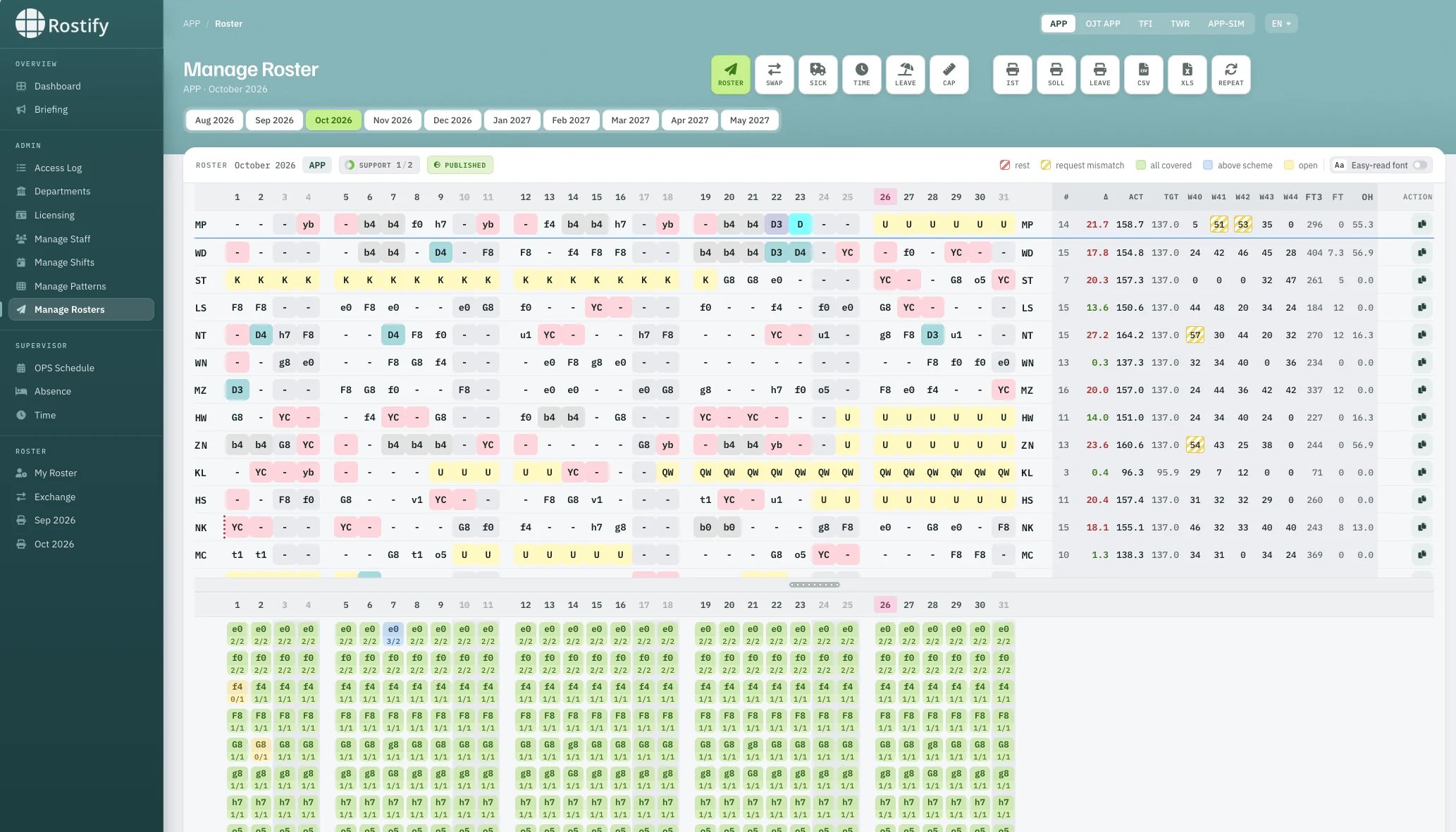
Rosters that check themselves.
Generate a month in one click along editable patterns. Every assignment is checked against rest periods, fatigue limits, general and single shift requests, licence validity and many more parameters — conflicts are visible before publication and can be avoided. Across all watches — job sharers included.
 12345
12345 - 1Units APP, OJT APP, TFI, TWR, APP-SIM — one system.
- 2Roster, swap, sick, time, leave — one click from the grid.
- 3Cell states: rest, request mismatch, covered, above scheme, open.
- 4Actual against target hours, per week and month.
- 5Coverage per shift code and day.
ATS.OR.320 · Regulation (EU) 2017/373
Your rostering system, as a rule set.
ATS providers have to specify these elements of their rostering system. Rostify checks each assignment against them — at generation, on every swap and on every replacement.
a1Max. consecutive working daysa2Max. hours per duty perioda3Max. time on position without breaka4Ratio of duty periods to breaksa5Min. rest periodsa6Max. consecutive night dutiesa7Min. rest after night dutya8Min. rest periods per roster cycle- …and many more. In automatic planning Rostify weighs more than 75 parameters — or you plan fully by hand.
02 →Monthly roster→Rest, fatigue and duty limits→Sick leave and replacement
03 · Position plan
Plan the positions. Protect the people.
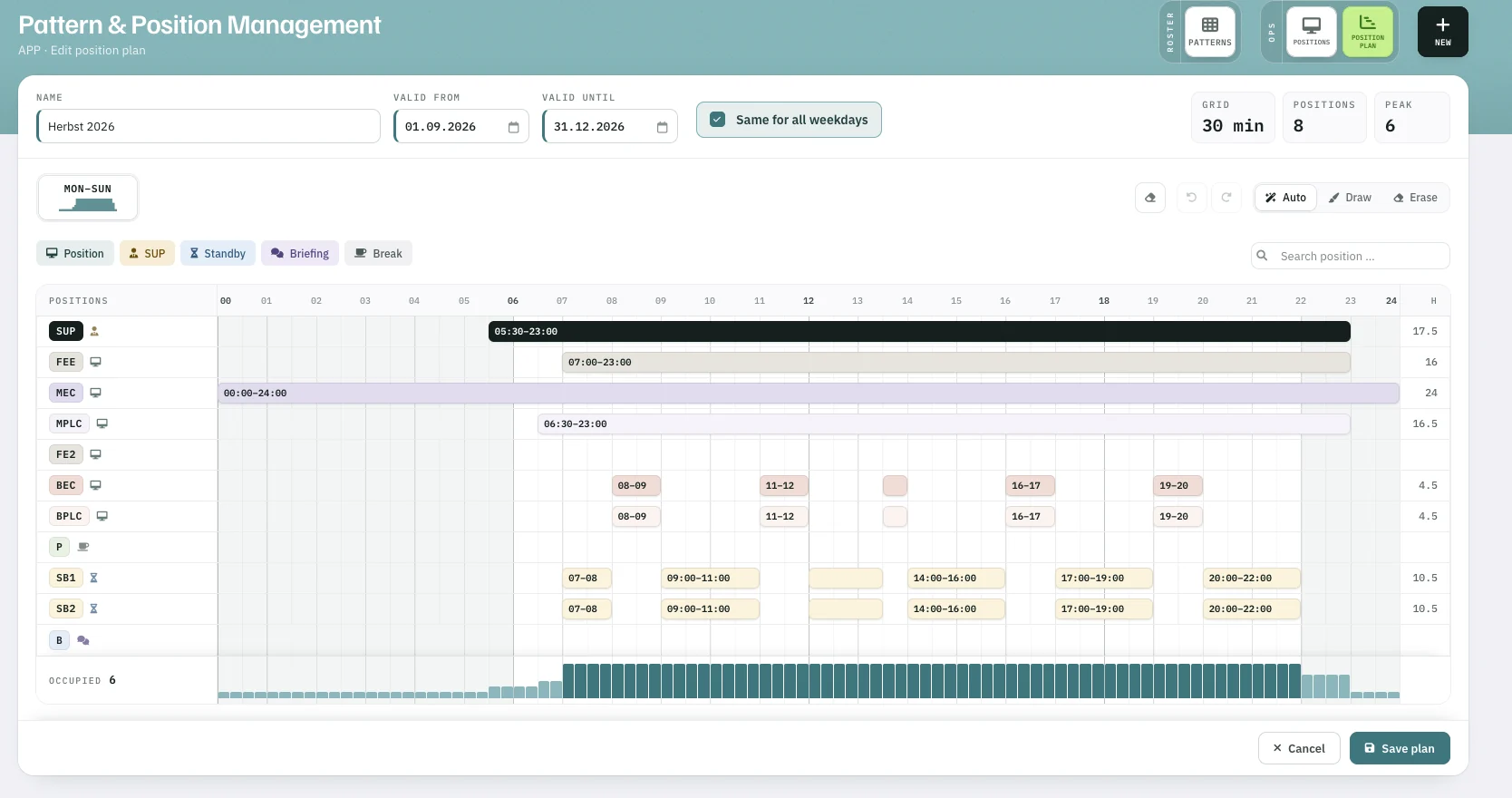
Model every position your unit has to staff — supervisor, executive and planner positions, standby, briefing and breaks — in a 15-, 30- or 60-minute grid, valid for a season or traffic period. Then shape shifts that deliver efficiency and well-being — rest, fatigue and fairness are part of the calculation, not an afterthought.
 12345
12345 - 1Validity per season or traffic period.
- 2Position types: position, SUP, standby, briefing, break.
- 3Draw blocks by hand or place them automatically.
- 415-, 30- or 60-minute grid — here 30 min, SUP 05:30–23:00.
- 5Occupancy profile of the day — peak 6 positions.
FIG. 03 · Optimal pattern from position plan
The engine calculates the shifts that cover it.
Economical or employee-friendly, normal or long shifts, briefing at the start or the end of duty. Rostify returns the required shifts per weekday, checks them against your rule set and marks the shift types you have not yet set up in the software.
- 1,160.6 hper week — optimal pattern
- −95.2 hper week vs. existing shifts (−7.6 %)
- 0uncovered positions
- 0rule violations
Example unit · pattern for December 2026 · economical, long shifts preferred, briefing at the end.
03 →Position plan→Optimal pattern calculation→Shift patterns
04 · Daily OPS
The day, slot by slot.
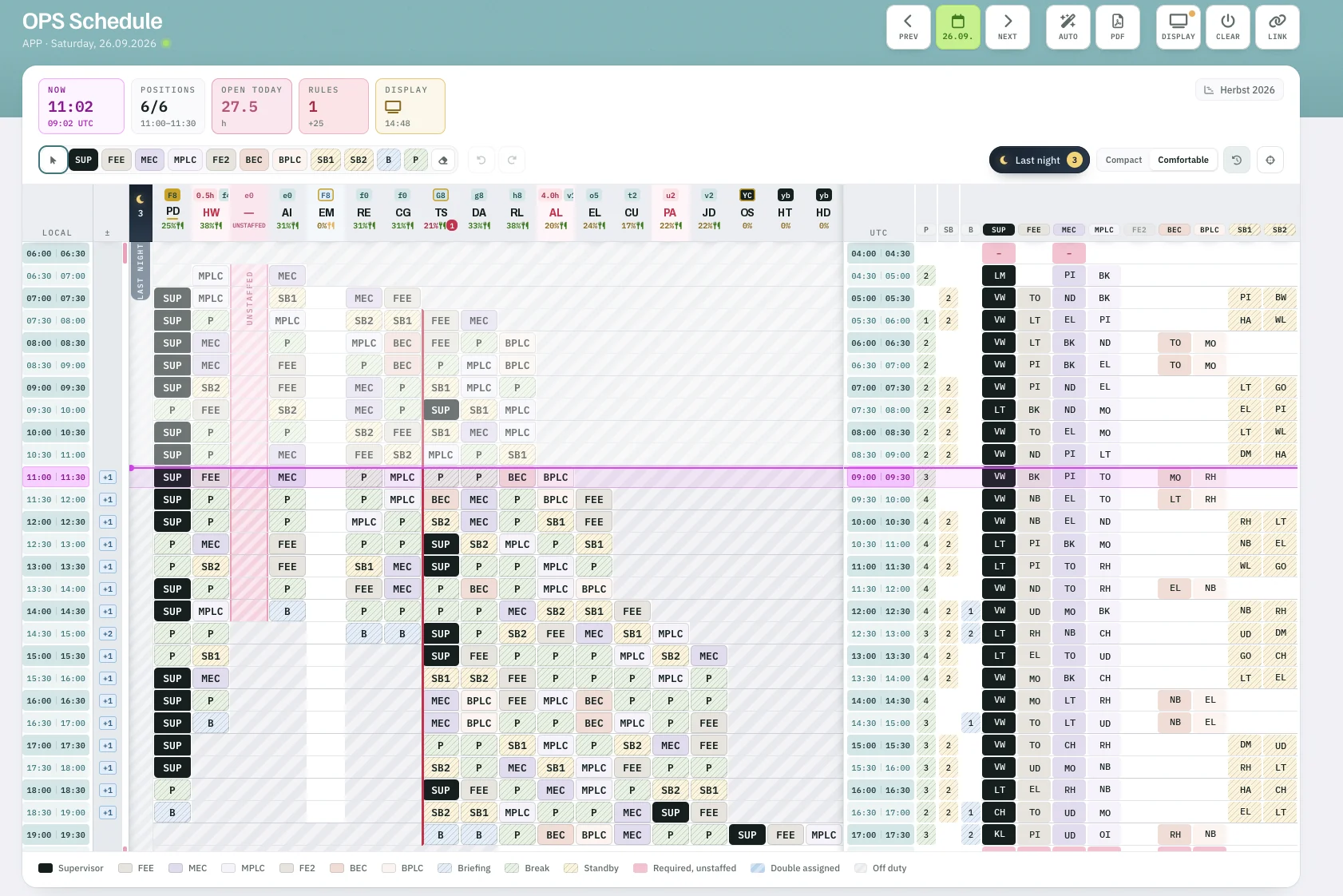
The OPS schedule turns the roster into the day. Supervisors assign positions to the controllers on duty — by hand or automatically — with the NOW line, last night’s handover, unstaffed requirements and double assignments in plain sight. In local time and UTC.
 1234567
 - 1NOW in local time and UTC.
- 2Positions staffed, open hours today, rule hits.
- 3Last night — handover from the night duty.
- 4Required but unstaffed — impossible to overlook.
- 5NOW line across every position.
- 6UTC view: who is on which position.
- 7Display mode and share link for the ops room.
OJT · On-the-job training
Every trainee has their trainer.
Trainee and OJTI are rostered as a pair and put on the same position in the OPS schedule. No training slot without a trainer, no gaps in the training plan — and the working time at the controller working position (CWP) is recorded.
05 · Licensing & licence management
Expiry is never a surprise.
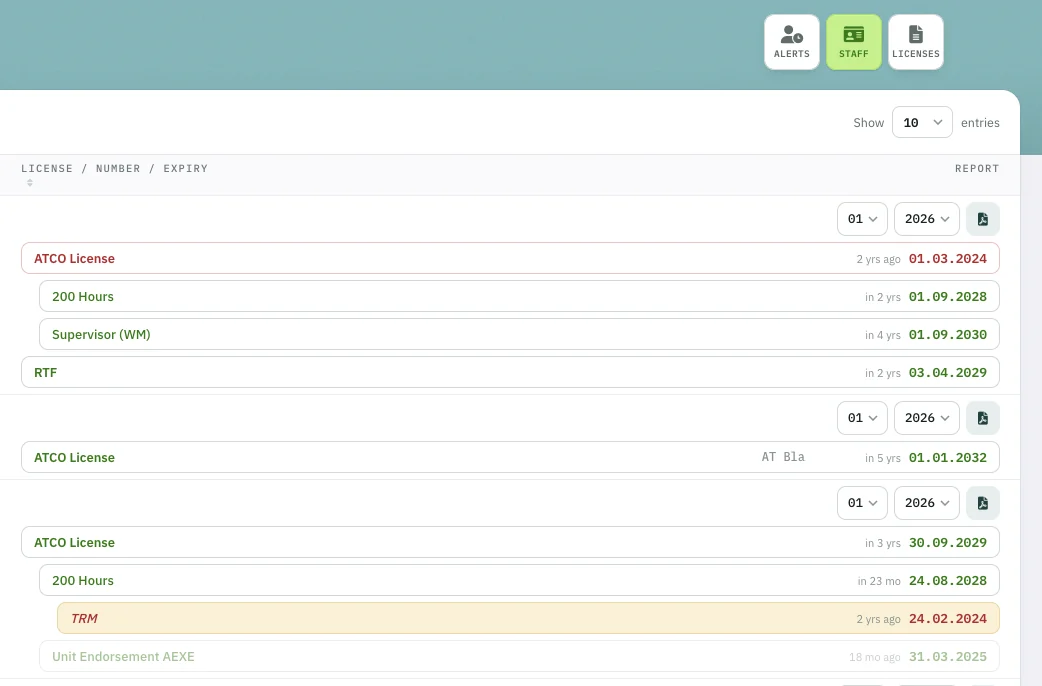
Qualifications, licences, ratings, endorsements and hour requirements live in one tree per person. Each shift declares which of them it requires. If an assignment doesn’t match, Rostify warns the administrator and the supervisor — the plan itself keeps running. Alerts are generated before a licence expires.
 123456
 - 1Expired — flagged in red.
- 2Dependent licences nest under their parent.
- 3Time to expiry at a glance.
- 4Warning threshold hit — highlighted.
- 5Licence report per controller and month, as PDF.
- 6Alerts for admins and controllers.
06 · E-Briefing
Every briefing read — provably.
Mandatory or informative, addressed to departments, groups or single controllers, with up to five attachments — plus daily briefings, e.g. from the supervisor. Every read is confirmed per person; whoever is unbriefed shows up on the supervisor dashboard before taking position.
Procedure change — effective AIRAC 2611
07 · Crew
The roster in every controller’s pocket.
My Roster in the app and the browser: current roster, hours, swap requests with rule check, leave requests and briefings. The same database as the ops room — no printed roster on the wall, no stale PDF.
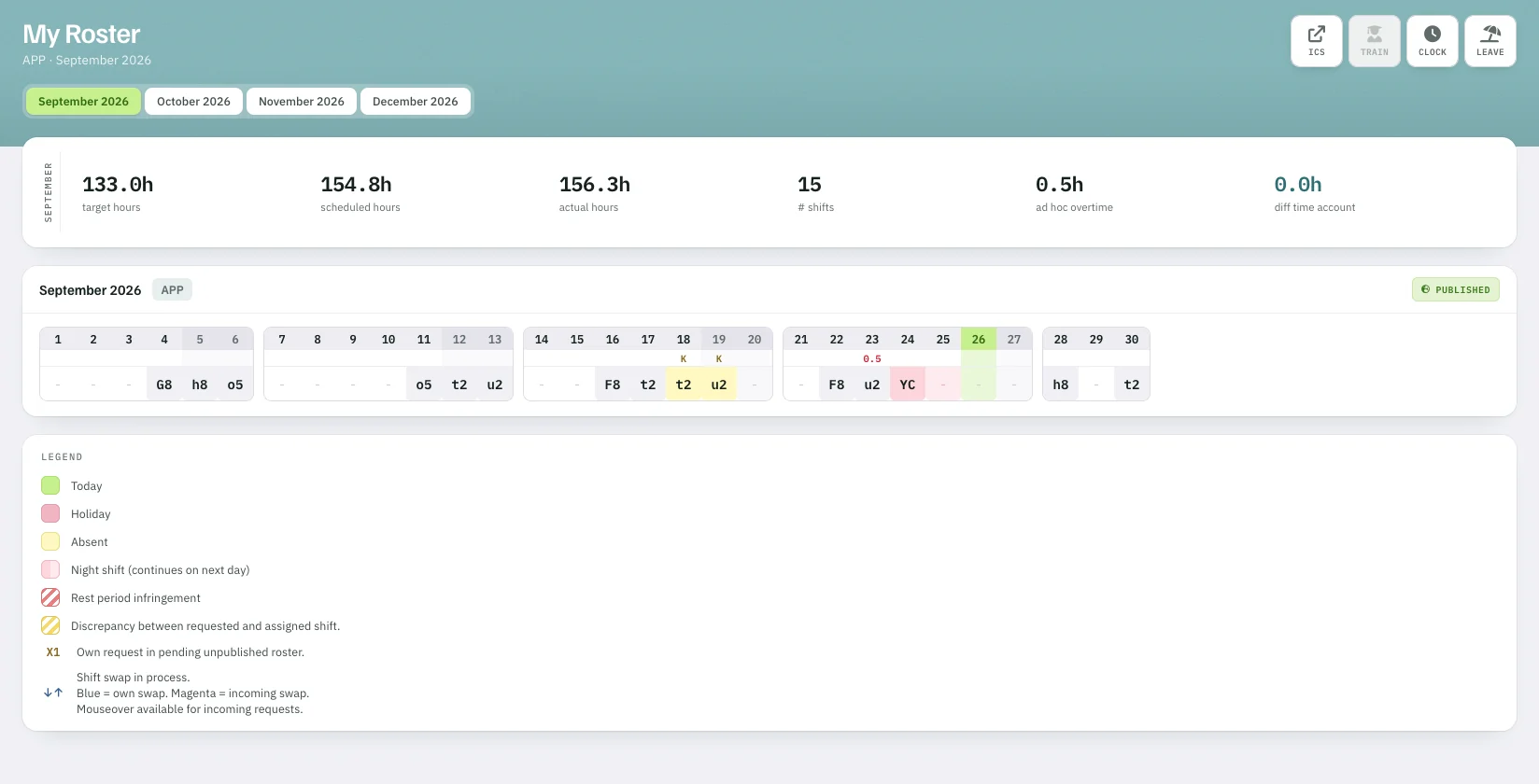 123
123 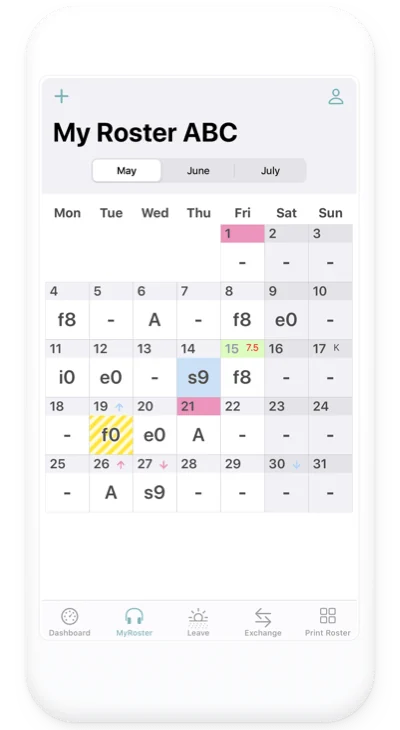
Shift Trading
Only rule-compliant partners are offered. Greyed shifts show why they can’t be swapped.
Leave
Requests go straight into leave planning and the annual view.
Requests
Shift wishes feed the next generation — mismatches are marked, not hidden.
Calendar
ICS export into the controller’s own calendar.
08 · Beyond ANSP
Other operations, same model.
Wherever qualified people hold positions around the clock, work shifts and must prove they were briefed, the model is identical. Only the names change.
ANSP · ATM first
Rostify was developed for air navigation service providers: ATCO licences and endorsements, ATS.OR.320, OJT, briefings. The same model fits every operation that staffs certified positions around the clock.
- 08.1Military ATC
Controller ratings, unit endorsements, mission briefings.
- 08.2AIM · AIS
24/7 AIS and NOTAM desks with documented competence.
- 08.3Airport operations
Apron control, handling agents, ARFF and security staff that require certification.
- 08.4Rail traffic control
Signallers and dispatchers with route knowledge and licences.
- 08.5Grid control
System operators with switching authorisations, 24/7.
- 08.6Emergency dispatch
Minimum staffing per console, certified call-takers and dispatchers.
- 08.7Vessel traffic services
VTS operators and supervisors on certified watch positions.
- 08.8Your control room
Show us your positions and qualifications — we map them for your demo.
Request a trial →
09 · Specification
Technical data.
- Deployment
- Cloud, in the browser — no installation
- Development, hosting
- Development: Vienna, Austria · Hosting: Austria, Germany and France (EU)
- Organisation
- Units and departments — e.g. ACC, APP, TWR, OJT, SIM — with their own settings
- Scale
- 2 to 1,500 staff
- Time base
- Local time and UTC
- Rostering
- 1-click generation along editable patterns, or fully manual · across watches, incl. job sharers
- Position planning
- 15-, 30- or 60-minute grid, validity per season or traffic period
- Pattern engine
- Economical or employee-friendly · normal or long shifts · briefing at start or end · or fully manual design
- Rule checks
- Rest, fatigue and duty limits, shift and general requests · automatic planning (optional) weighs more than 75 parameters
- Licensing
- Licence tree per person, warning thresholds, PDF report · issues warn admin and supervisor, never block the plan
- Training (OJT)
- Trainer–trainee pairing, OJT unit roster, training documentation
- E-Briefing
- Mandatory or informative, daily briefings (e.g. from the supervisor), up to 5 attachments, read confirmation per user
- Absence
- Sick leave, replacement proposals, overtime requests by SMS, overtime volunteering via the app
- Ops room
- Display mode and share link for the OPS schedule
- Exports
- PDF, CSV, XLS, ICS · actual, target and leave prints
- Audit
- Access log
- Languages
- English, German · easy-read font option
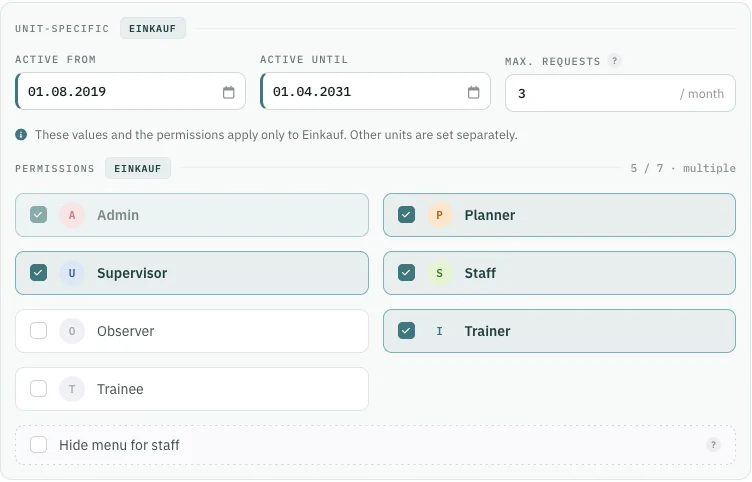
Seven roles — admin, planner, supervisor, staff, observer, trainer, trainee — combined per person and set per unit. An instructor can be trainer in APP and staff in TWR.
Next step
Bring one month of your roster.
Show us your shift logic and we’ll rebuild it in Rostify shortly — with your shift codes, your roster, your licences, your requirements. No complex installation. You get limited trial access and see for yourself.
+43 1 4120052office[at]rostify.app
- 145 minutes. Online demo on your date — book it directly.
- 2One month. Send us an anonymised roster; we rebuild it with your codes and rules.
- 3Trial access. Your unit as a model unit with sample staff, 30 days. Then you decide.
Onepager ↓PDF · v1.3 · 2026-10-02Deutsch ↓